# Next.js use cache Explained: Cache Components, cacheLife and cacheTag in Next.js 16.4
**Next.js `use cache`** is a directive that marks an async function, component or whole file as cacheable, so its output is stored and reused for matching inputs. It is the core of **Cache Components**, the caching model that Next.js 16.4 now turns on by default in `create-next-app`. Add `'use cache'`, set a lifetime with `cacheLife`, label it with `cacheTag`, and invalidate it with `updateTag` or `revalidateTag`.
This guide is written against **Next.js 16.4.2 and React 19.3**, the current releases. I scaffolded a fresh app with `create-next-app@16.4.2` (its generated `next.config.ts` already contains `cacheComponents: true` and `partialPrefetching: true`), wrote every example below, then type-checked, linted, built and ran it with `next start`. The build output, headers and timestamps shown are the real ones I got back. Framework behavior links to the official Next.js docs.
> **Security note:** the [October 14, 2026 Next.js security update](https://nextjs.org/blog/nextjs-security-update-october-14-2026) fixed a critical remote code execution bug in `use cache` functions that return multiple typed arrays. If you use Cache Components, run Next.js 16.4.1 or later before you ship anything from this post.
## What does "use cache" do in Next.js?
`'use cache'` tells Next.js that a function's return value depends only on its inputs, so it can be stored and reused. The first call runs the function and saves the output; later calls with the same arguments get the saved output until the entry revalidates. Cached output can also be baked into the page's prerendered static shell.
The [official `use cache` reference](https://nextjs.org/docs/app/api-reference/directives/use-cache) lists what goes into a cache key:
1. **Build ID**: every deploy gets new keys, so caches do not survive a deploy.
2. **Function ID**: a secure hash of where the function lives and its signature.
3. **Serializable arguments**: function arguments or component props.
4. **Closed-over variables**: values captured from an outer scope become part of the key.
That makes it different from the old App Router model, where `fetch` calls and route segments were cached implicitly. With Cache Components, **nothing is cached unless you say so**, and anything you do cache is explicit at the call site.
### Quick definitions
| Term | What it means |
| --- | --- |
| Cache Components | The Next.js 16 programming model behind `cacheComponents: true`: explicit `use cache`, Partial Prerendering and Suspense streaming ([docs](https://nextjs.org/docs/app/api-reference/config/next-config-js/cacheComponents)) |
| `'use cache'` | Directive that caches a function, component or file's exports, shared across users |
| `cacheLife` | Sets how long an entry is fresh (`stale`, `revalidate`, `expire`) ([docs](https://nextjs.org/docs/app/api-reference/functions/cacheLife)) |
| `cacheTag` | Labels an entry so you can invalidate it on demand ([docs](https://nextjs.org/docs/app/api-reference/functions/cacheTag)) |
| `updateTag` | Expires a tag immediately from a Server Action; the next read waits for fresh data |
| `revalidateTag` | Marks a tag stale from a Server Function or Route Handler; serves stale while it refreshes |
| Static shell | The prerendered HTML of a route, including cached output and Suspense fallbacks |
## TL;DR: Next.js use cache in five lines
| You want to... | Do this |
| --- | --- |
| Cache a database query or API call for everyone | `'use cache'` + `cacheLife('hours')` + `cacheTag('x')` in the data function |
| Show a user's change right after they submit a form | `updateTag('x')` inside the Server Action |
| Refresh after a CMS or Stripe webhook | `revalidateTag('x', 'max')` in a Route Handler |
| Read cookies or headers | Read them outside the cached scope and pass values as arguments |
| Cache something that must read cookies inside | `'use cache: private'` (per browser only) |
| Share a cache across many server instances | `'use cache: remote'` with a cache handler |
## Is Cache Components enabled by default in Next.js 16.4?
Yes, for new apps. Since [Next.js 16.4](https://nextjs.org/blog/next-16-4), released on October 6, 2026, every app created with `create-next-app` has Cache Components enabled, and the Next.js team says it will become the default for all apps in Next.js 17. Existing apps keep the old model until you add `cacheComponents: true`.
This is what `create-next-app@16.4.2` generated for me, unedited apart from the Tailwind loader lines:
```ts
// next.config.ts
import type { NextConfig } from 'next'
const nextConfig: NextConfig = {
cacheComponents: true,
partialPrefetching: true,
}
export default nextConfig
```
`next build` confirms it at the top of the log:
```bash
✓ Running next.config.ts took 21ms
- Cache Components enabled
- Partial Prefetching enabled
```
## How do you use "use cache" in Next.js? (step by step)
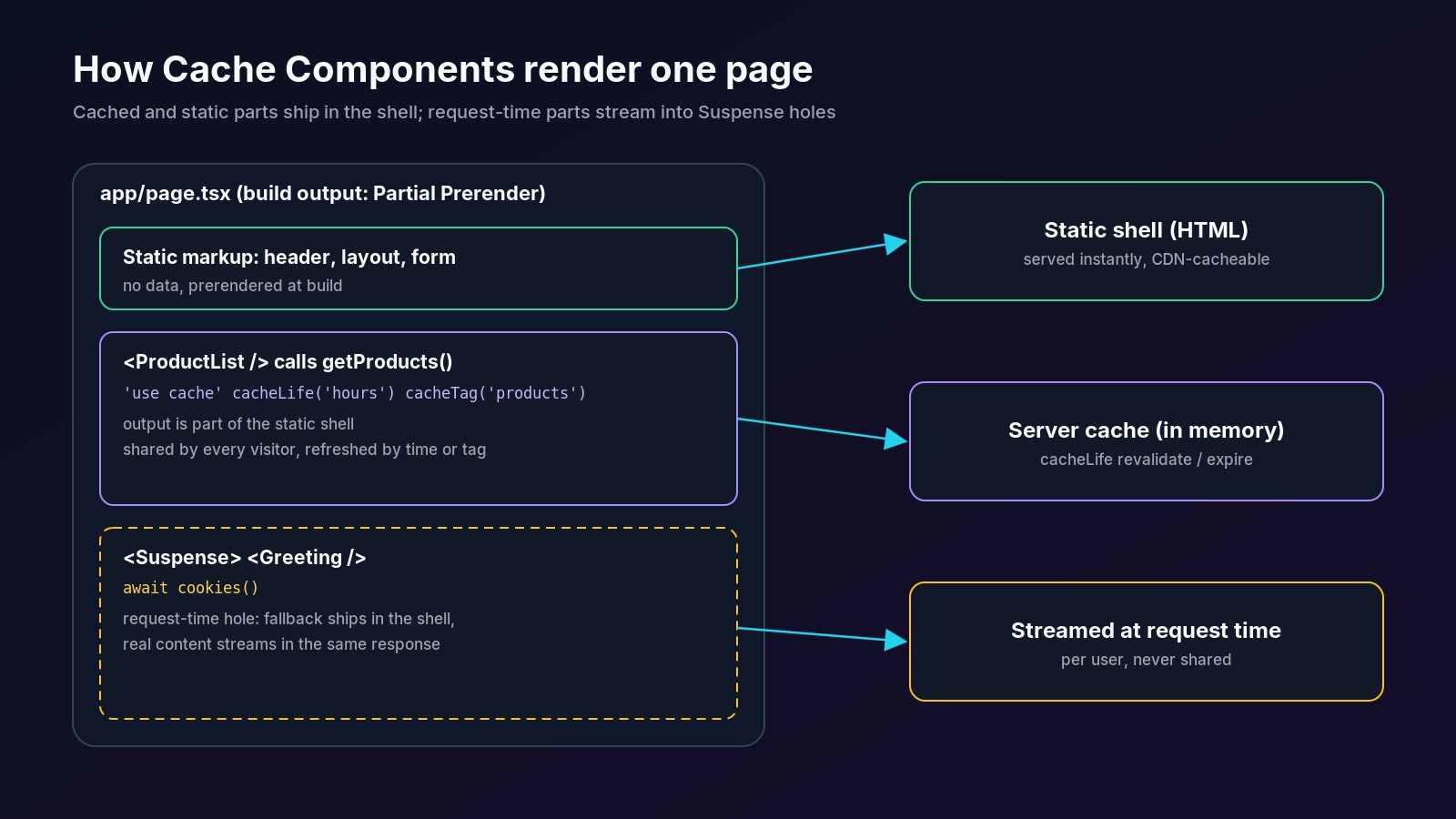
Here is the full working pattern from my test app: a product list that every visitor shares, a greeting that reads a cookie, and a form that adds a product.
### Step 1: cache the data function
Put the directive at the top of the async function body, then set an explicit lifetime and a tag:
```ts
// lib/products.ts
import { cacheLife, cacheTag } from 'next/cache'
import { queryProducts } from './db'
// Shared, cached data function: one entry for every visitor.
export async function getProducts() {
'use cache'
cacheLife('hours')
cacheTag('products')
const products = await queryProducts()
return { products, cachedAt: new Date().toISOString() }
}
```
`cachedAt` is there only to prove caching in the tests below. Because `new Date()` runs inside the cached scope, its value is stored with the entry, and the route still prerenders.
### Step 2: render cached and request-time parts on one page
```tsx
// app/page.tsx
import { Suspense } from 'react'
import { cookies } from 'next/headers'
import { getProducts } from '@/lib/products'
import { addProduct } from './actions'
export default function Home() {
return (
Store
{/* Request-time hole: reads a cookie, so it streams in */}
Loading greeting...}>
{/* Cached: part of the static shell */}
)
}
async function Greeting() {
const name = (await cookies()).get('name')?.value ?? 'guest'
return Hi, {name}
}
async function ProductList() {
const { products, cachedAt } = await getProducts()
return (
{products.map((p) => (
- {p.name}: ${p.price}
))}
cached at {cachedAt}
)
}
```
### Step 3: invalidate from a Server Action with updateTag
```ts
// app/actions.ts
'use server'
import { updateTag } from 'next/cache'
import { insertProduct } from '@/lib/db'
export async function addProduct(formData: FormData) {
const name = String(formData.get('name') ?? '').trim()
const price = Number(formData.get('price'))
if (!name || !Number.isFinite(price)) return
await insertProduct({ name, price })
// Expire the tag now: the next read waits for fresh data
// (read-your-own-writes for the user who submitted the form).
updateTag('products')
}
```
In a real app, authenticate and authorize inside the action first. My [Server Actions vs Route Handlers guide](https://www.fabwaseem.com/blog/server-actions-vs-route-handlers) covers why every action is a public endpoint.
### Step 4: invalidate from a webhook with revalidateTag
```ts
// app/api/revalidate/route.ts
import { revalidateTag } from 'next/cache'
// Called by a CMS or admin webhook after products change.
export async function POST(request: Request) {
if (request.headers.get('authorization') !== `Bearer ${process.env.REVALIDATE_SECRET}`) {
return Response.json({ error: 'unauthorized' }, { status: 401 })
}
// Stale-while-revalidate: visitors keep getting the old list
// while the next request refreshes it in the background.
revalidateTag('products', 'max')
return Response.json({ revalidated: true })
}
```
### Step 5: build and read the route table
```bash
Route (app) Revalidate Expire
┌ ◐ / 1h 1d
├ ○ /_not-found
├ ◐ /account
├ ○ /api/products 1h 1d
└ ƒ /api/revalidate
○ (Static) prerendered as static content
◐ (Partial Prerender) prerendered as static HTML with dynamic server-streamed content
ƒ (Dynamic) server-rendered on demand
```
The home page is **◐ Partial Prerender**: the product list is in the static shell, and the cookie greeting streams in. The `1h` / `1d` columns come straight from the `hours` profile. The webhook route is dynamic, as it should be.
## Does it actually cache? What I measured with next start
These are the real responses from `next start` on the test app.
**Two requests, one entry.** A `GET` Route Handler that calls `getProducts()` returned the same timestamp twice. It was filled during `next build` and reused:
```bash
$ curl -s localhost:3141/api/products
{"count":2,"cachedAt":"2026-10-17T13:01:48.233Z"}
$ curl -s localhost:3141/api/products
{"count":2,"cachedAt":"2026-10-17T13:01:48.233Z"}
```
**Shared cache, personal hole.** Sending `cookie: name=Waseem` changed the greeting to `Hi, Waseem` while the product list kept the same `cached at` value. The response headers show how Next.js treats the page:
```bash
x-nextjs-stale-time: 300
x-nextjs-prerender: 1
x-nextjs-postponed: 1
```
`x-nextjs-stale-time: 300` is the 5-minute client `stale` value from the `hours` profile, and `x-nextjs-postponed: 1` means part of the page was deferred to request time.
**revalidateTag is stale-while-revalidate.** Without the bearer token the webhook returned `401`. With it, the first request after revalidation still got the old entry, and the next one got a fresh one:
```bash
$ curl -s -X POST -H 'authorization: Bearer s3cret' localhost:3141/api/revalidate
{"revalidated":true}
$ curl -s localhost:3141/api/products
{"count":2,"cachedAt":"2026-10-17T13:01:48.233Z"} # stale, refresh starts
$ curl -s localhost:3141/api/products
{"count":2,"cachedAt":"2026-10-17T13:02:01.283Z"} # fresh
```
**updateTag is read-your-own-writes.** In a headless Chrome test, submitting the form with "Webcam, 59" re-rendered the list with three items and a new `cached at` time in the same navigation. A second browser that opened the page afterwards saw the same three items and the same new timestamp, so the shared entry was replaced, not forked per user.
## What are the cacheLife profiles?
`cacheLife` sets three values: `stale` (how long the browser may reuse it without asking), `revalidate` (after which the server refreshes it in the background) and `expire` (after which a request must wait for fresh data). These are the built-in presets from the [cacheLife reference](https://nextjs.org/docs/app/api-reference/functions/cacheLife):
| Profile | Use case | `stale` | `revalidate` | `expire` |
| --- | --- | --- | --- | --- |
| `default` | Standard content | 5 minutes | 15 minutes | never |
| `seconds` | Real-time data | 30 seconds | 1 second | 1 minute |
| `minutes` | Frequently updated content | 5 minutes | 1 minute | 1 hour |
| `hours` | Updated several times a day | 5 minutes | 1 hour | 1 day |
| `days` | Updated daily | 5 minutes | 1 day | 1 week |
| `weeks` | Updated weekly | 5 minutes | 1 week | 30 days |
| `max` | Rarely changes | 5 minutes | 30 days | 1 year |
Three rules worth remembering:
- **Always set `cacheLife` explicitly.** Without it the `default` profile applies, and nesting a short-lived cache inside a scope with no explicit `cacheLife` fails the build during prerendering.
- **The browser keeps cached output for at least 30 seconds.** The client router enforces a minimum 30-second stale time regardless of your profile.
- **You can define custom profiles** in `next.config.ts` under `cacheLife`, or pass an inline object such as `cacheLife({ stale: 60, revalidate: 600, expire: 3600 })`.
## updateTag vs revalidateTag: which should you use?
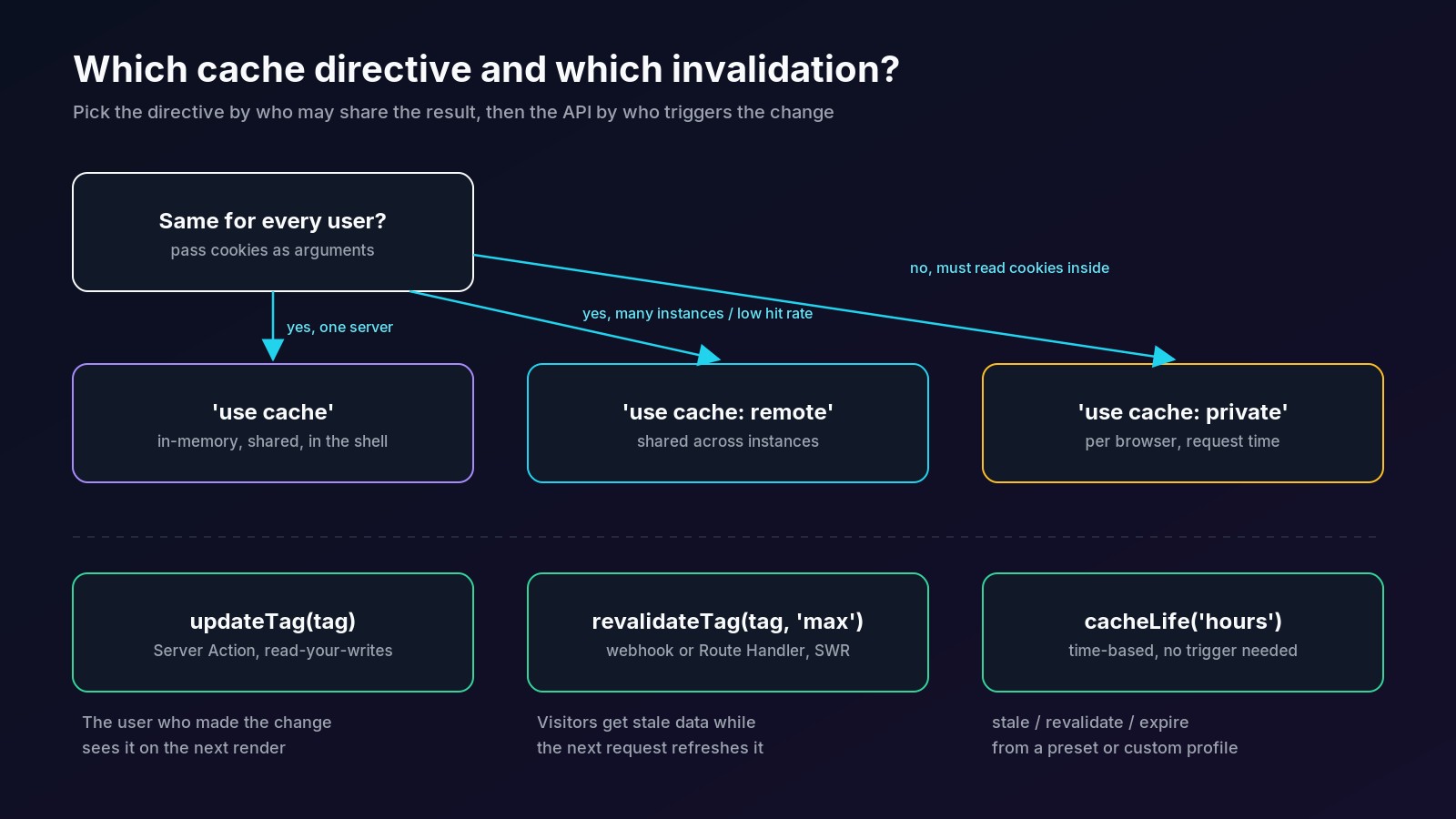
Use `updateTag` inside a Server Action when the user who made a change must see it on the very next render. Use `revalidateTag(tag, 'max')` from a Route Handler or webhook when a short window of stale data is fine. `updateTag` blocks the next read until fresh data loads; `revalidateTag` serves stale content while it refreshes.
| | `updateTag(tag)` | `revalidateTag(tag, 'max')` |
| --- | --- | --- |
| Where it runs | Server Actions only | Server Functions and Route Handlers |
| Next read | Waits for fresh data | Gets stale data, triggers a refresh |
| Best for | Forms, settings, carts: read-your-own-writes | CMS publish, Stripe and GitHub webhooks, admin jobs |
| In a Route Handler | Throws | Works |
The [revalidateTag reference](https://nextjs.org/docs/app/api-reference/functions/revalidateTag) recommends the `'max'` profile and marks the single-argument form as deprecated; it behaves like `{ expire: 0 }`, a blocking cache miss. Tags are case-sensitive and capped at 256 characters, and a longer tag is silently never assigned. Revalidation is triggered by the next request, not by the call itself, so pages refresh as they are visited.
## use cache vs use cache: private vs use cache: remote
Next.js has three caching directives. Plain `'use cache'` covers most apps. The other two solve specific problems, and the [use cache: remote reference](https://nextjs.org/docs/app/api-reference/directives/use-cache-remote) compares them:
| Feature | `'use cache'` | `'use cache: remote'` | `'use cache: private'` |
| --- | --- | --- | --- |
| Server-side storage | In memory or a cache handler | Remote cache handler | None |
| Shared between users | Yes | Yes | No, per browser |
| Can call `cookies()` / `headers()` inside | No, pass values as arguments | No, pass values as arguments | Yes |
| Extra cost | None | Storage and network | None |
| Survives a deploy | No | No | N/A |
### When should you use "use cache: private"?
Use it only when a function must read cookies or headers itself and you cannot refactor it to take those values as arguments, or when compliance rules forbid storing request data in a server cache. It runs at request time, is excluded from the static shell and is cached only in the browser. This is the version from my test app:
```tsx
// app/account/page.tsx (excerpt)
import { cookies } from 'next/headers'
import { cacheLife } from 'next/cache'
// Reads cookies directly. Cached per browser only, never in a shared server cache.
async function getPreferences() {
'use cache: private'
cacheLife({ stale: 60 })
const currency = (await cookies()).get('currency')?.value ?? 'USD'
return { currency }
}
```
With a `currency=PKR` cookie the page rendered `Currency: PKR`, and the route still built as ◐ because the component sits inside ``.
### When does "use cache: remote" make sense?
When request-time content gets low hit rates from per-instance memory: serverless functions, many replicas, or an expensive upstream such as a slow CMS. It stores entries in a shared handler like Redis. Skip it when operations already take under about 50 ms, when keys are mostly unique per request, or when data changes every few seconds; the docs list those as cases where remote caching does not pay off.
## Does "use cache" work when self-hosting with Docker or Coolify?
Yes. The official platform table lists both the Node.js server and Docker as supported, and static export as not supported. When self-hosted, the default in-memory cache persists across requests in the same process, which is exactly what the `next start` tests above show. Size it with `cacheMaxMemorySize`.
Two things change once you run more than one container:
- **Each replica has its own memory cache.** Two instances can serve different `cachedAt` values until both refresh. Configure a shared [`cacheHandlers`](https://nextjs.org/docs/app/api-reference/config/next-config-js/cacheHandlers) entry (for example Redis) if that matters.
- **Every deploy starts cold.** The cache key includes the build ID, so `use cache` entries do not carry over. For data that must survive deploys, the docs still point to `unstable_cache` or the `fetch` cache.
If you are deploying this way, my [self-hosting Next.js with Coolify guide](https://www.fabwaseem.com/blog/self-host-nextjs-with-coolify) and [production Next.js Dockerfile](https://www.fabwaseem.com/blog/nextjs-dockerfile) cover the container side.
## How do you migrate an existing app to Cache Components?
Enable `cacheComponents: true`, then replace each route segment config the build complains about. The [migration guide](https://nextjs.org/docs/app/guides/migrating-to-cache-components) says routes that still export `dynamic`, `revalidate` or `fetchCache` will error once the flag is on. Most of the work is mechanical:
| Before (old App Router) | After (Cache Components) |
| --- | --- |
| `export const revalidate = 3600` | `'use cache'` + `cacheLife('hours')` around the data or UI |
| `export const revalidate = 0` / `force-dynamic` | Remove it; uncached data already runs at request time |
| `export const fetchCache = 'force-cache'` | Wrap the data in `'use cache'` |
| `unstable_cache(fn, keys, { tags, revalidate })` | Optional: `'use cache'` + `cacheTag` + `cacheLife`; the old API keeps working |
| `fetch(url, { next: { tags } })` | `cacheTag` inside a `'use cache'` function |
| `revalidateTag('x')` | `updateTag('x')` in actions, `revalidateTag('x', 'max')` elsewhere |
For a large app, adopt it incrementally:
1. Turn on the flag and migrate the segment configs above.
2. Opt out routes that are not ready with `export const instant = false`, or run the codemod across the app: `npx @next/codemod@canary cache-components-instant-false ./app`.
3. Fix synchronous IO such as `new Date()`, `Math.random()` and `crypto.randomUUID()` in the prerendered shell; `instant = false` does not clear those errors. Move the call into a cached scope, a Client Component, or behind `connection()` inside ``.
4. Remove `instant = false` one route at a time and resolve the dev overlay insights.
If you use a coding agent, Next.js ships a skill for this: `npx skills add vercel/next.js --skill next-cache-components-adoption`, then ask the agent to adopt Cache Components with it.
## What can't you do inside "use cache"?
Cached functions run in an isolated environment, and four limits catch most people:
- **No request APIs.** `cookies()`, `headers()` and `searchParams` are not allowed, even in a helper the cached function calls. On dynamic routes this can pass `next build` and fail under `next start` with the `next-request-in-use-cache` error.
- **Serializable inputs and outputs only.** Arguments follow Server Component serialization, return values follow Client Component serialization. Class instances, symbols, `URL` objects and functions (except as pass-through) are rejected.
- **`React.cache` does not cross the boundary.** Values stored with `React.cache` outside a cached scope are not visible inside it. Pass data as arguments.
- **Promises of runtime data hang the build.** Passing a `cookies()` promise or uncached data into a cached function makes prerendering wait, and the build times out after 50 seconds.
For debugging, run `NEXT_PRIVATE_DEBUG_CACHE=1 npm run start` for verbose cache logs. In development, logs from cached functions are replayed with a `Cache` prefix.
## Common "use cache" mistakes
| Mistake | What happens | Fix |
| --- | --- | --- |
| Calling `cookies()` inside `'use cache'` | `next-request-in-use-cache` error | Read it outside and pass the value in |
| Caching per-user data with plain `'use cache'` | Users can see each other's data if the key misses the user ID | Add the user ID as an argument, or use `'use cache: private'` |
| No `cacheLife` | `default` profile applies; nested short caches can fail the build | Set a profile in every cached scope |
| `updateTag` in a Route Handler | Throws at runtime | Use `revalidateTag(tag, 'max')` |
| `revalidateTag('x')` with one argument | Deprecated, blocking miss | Pass `'max'` or migrate to `updateTag` |
| Expecting caches to survive deploys | Cold cache after each deploy | Accept it, or use `unstable_cache` / `fetch` cache for that data |
| Several replicas, default handler | Replicas disagree for a while | Shared `cacheHandlers` or `'use cache: remote'` |
| Running Next.js below 16.4.1 | Exposed to the October 2026 critical advisories | Upgrade now |
**Related:** Next.js 16.4.1 patched a critical RCE in `use cache` functions that return typed arrays; see the [Next.js security update October 2026](https://www.fabwaseem.com/blog/nextjs-security-update-october-2026). To let an AI agent do the migration for you, install the official `next-cache-components-adoption` skill as shown in [Agent Skills: how to write a SKILL.md](https://www.fabwaseem.com/blog/agent-skills).
**Related:** I reused this demo app to benchmark the [TypeScript 7 upgrade](https://www.fabwaseem.com/blog/typescript-7): the `next build` type-check step dropped from 1,368 ms to 231 ms.
**Related:** my [React View Transitions guide](https://www.fabwaseem.com/blog/react-view-transitions) uses Cache Components with `connection()` so a Suspense fallback streams in and animates its reveal.
**Related:** for a side-by-side with a non-Next.js framework, see [TanStack Start vs Next.js](https://www.fabwaseem.com/blog/tanstack-start-vs-nextjs), where I benchmarked the same app on both for server throughput, client JS, hydration and build time.
## Key takeaways
- `'use cache'` caches an async function, component or file by its inputs; with Cache Components nothing else is cached implicitly.
- New Next.js 16.4 apps have Cache Components and Partial Prefetching on by default, and it becomes the default for all apps in Next.js 17.
- Pair every cached scope with `cacheLife` and `cacheTag`, then invalidate with `updateTag` in Server Actions or `revalidateTag(tag, 'max')` elsewhere.
- Request APIs stay outside cached scopes; pass their values in as arguments, or reach for `'use cache: private'` when you truly cannot.
- Self-hosted `next start` keeps entries in memory across requests, but not across deploys or between replicas.