How to Build an MCP Server in NestJS: Streamable HTTP, Guards and DI (Tested)
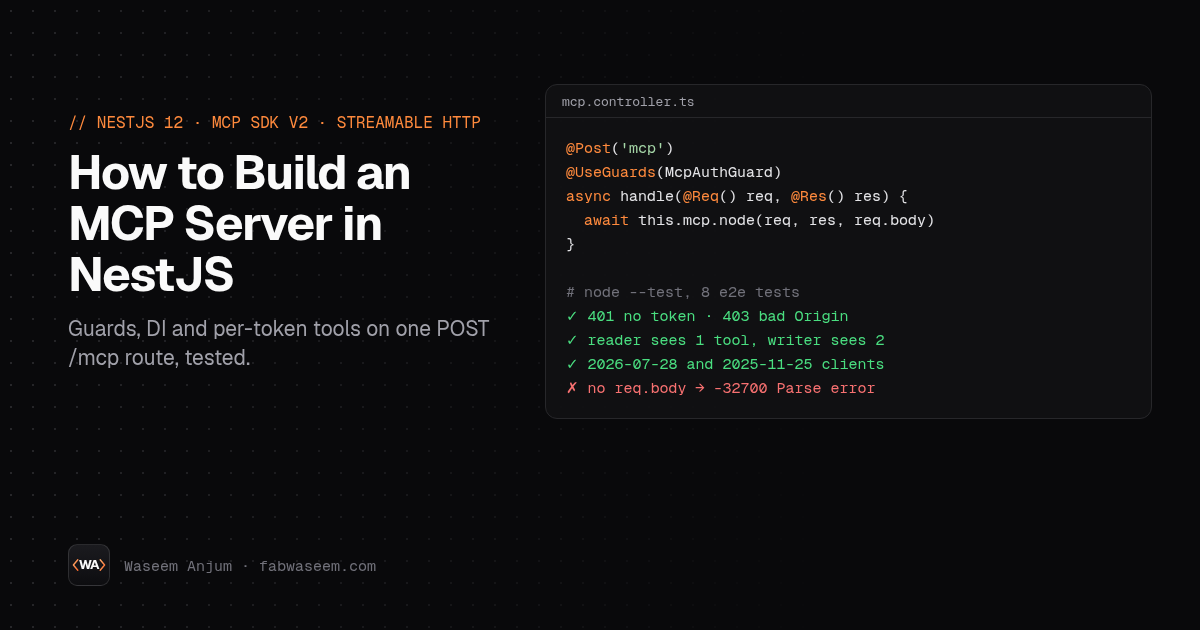
To build an MCP server in NestJS, install the official MCP TypeScript SDK (@modelcontextprotocol/server and @modelcontextprotocol/node), build one createMcpHandler inside an injectable service, and call it from a @Post('mcp') controller method that takes @Req() and @Res(). Put a Nest guard in front for the bearer token and Origin check, pass req.body to the handler, and your tools can use any provider through normal dependency injection.
I built exactly that on November 4, 2026 and tested it end to end: with curl, the MCP Inspector CLI, and 8 e2e tests that use the official MCP client against both protocol versions. Below is the full code, how the pieces fit, and five problems I hit that most tutorials skip, including one that turns every request into a Parse error.
Is there an official NestJS MCP module?
No. There is no @nestjs/mcp package: the npm registry returned 404 for it on November 4, 2026. You have two real options:
- Wire the official SDK yourself, which is what this guide does. It came to about 180 lines across a provider, a service, a guard, a controller and two modules, and you control auth, scopes and errors.
- Use the community module
@rekog/mcp-nest(MIT, version 2.0.9, about 384,000 npm downloads in the week of October 27 to November 2, 2026). Its README describes it as a NestJS microservice transport strategy: tools are@Tool()methods on@McpController()classes, so Nest guards, pipes, interceptors and filters apply, and it serves Streamable HTTP and STDIO. It peer-depends on the same v2 SDK packages and isn't maintained by the NestJS team.
Hand-wiring is worth understanding even if you end up on the module, because the gotchas below come from how Nest and the SDK share one Express request.
What I tested
Everything ran on one Linux VM (8 vCPUs) on Node.js 24.22.1:
- NestJS 12.3.2 with
@nestjs/platform-express(Express 5.3.0) @modelcontextprotocol/server2.4.0 and@modelcontextprotocol/node2.1.2, the v2 SDK@modelcontextprotocol/client2.4.0 for the e2e tests, MCP Inspector 2.13.0 for manual calls- Zod 4.6.7, TypeScript 6.0.3, tests on
node:test
The demo is a small notes API: a NotesService provider, a search_notes tool any token can call, and a create_note tool only a write-scoped token can see. If you're new to the SDK itself, my guide on building an MCP server in Next.js covers tools, schemas and the v1 to v2 changes in more depth.
Step 1: Install the packages
npm install @nestjs/common @nestjs/core @nestjs/platform-express reflect-metadata rxjs \
  @modelcontextprotocol/server @modelcontextprotocol/node zod
npm install -D typescript @types/node @types/express @nestjs/testing @modelcontextprotocol/client
NestJS 12 ships as ES modules ("type": "module" in @nestjs/core), so set "type": "module" in your package.json and use .js extensions in relative imports. The tsconfig.json I used:
{
  "compilerOptions": {
    "module": "nodenext",
    "moduleResolution": "nodenext",
    "target": "ES2023",
    "experimentalDecorators": true,
    "emitDecoratorMetadata": true,
    "strict": true,
    "strictPropertyInitialization": false,
    "skipLibCheck": true,
    "outDir": "dist",
    "rootDir": "."
  },
  "include": ["src", "test"]
}
Step 2: A normal Nest provider for your data
The tools should call the same services your REST controllers already use. Here an in-memory store stands in for a Prisma or TypeORM repository:
// src/notes/notes.service.ts
import { Injectable } from "@nestjs/common";

export interface Note { id: number; title: string; body: string; owner: string; createdAt: string }

@Injectable()
export class NotesService {
  private notes: Note[] = [];
  private nextId = 1;

  search(owner: string, q?: string): Note[] {
    const needle = q?.toLowerCase();
    return this.notes.filter(
      (n) => n.owner === owner && (!needle || `${n.title} ${n.body}`.toLowerCase().includes(needle)),
    );
  }

  create(owner: string, title: string, body: string): Note {
    const note = { id: this.nextId++, title, body, owner, createdAt: new Date().toISOString() };
    this.notes.push(note);
    return note;
  }
}
Export it from a NotesModule (providers: [NotesService], exports: [NotesService]) like any shared provider.
Step 3: The MCP service (handler, tools and DI)
This is the core. createMcpHandler takes a factory that returns a fresh McpServer, and the SDK's HTTP guide says the factory runs once per HTTP request and receives the request context, including authInfo. That gives you two things in Nest:
- The factory is an arrow function inside an
@Injectable()class, so every tool handler can usethis.notesor any other injected provider. - You can register a different set of tools per caller. A token without the write scope never sees
create_noteintools/list.
// src/mcp/mcp.service.ts
import { Injectable, Logger, OnModuleDestroy } from "@nestjs/common";
import { createMcpHandler, McpServer, type McpRequestContext } from "@modelcontextprotocol/server";
import { toNodeHandler } from "@modelcontextprotocol/node";
import * as z from "zod/v4";
import { NotesService } from "../notes/notes.service.js";

@Injectable()
export class McpService implements OnModuleDestroy {
  private readonly logger = new Logger(McpService.name);

  // Built once. The factory runs once per HTTP request, so every request gets a fresh McpServer.
  private readonly handler = createMcpHandler((ctx) => this.createServer(ctx), {
    responseMode: "json",
    onerror: (err) => this.logger.warn(err.message),
  });
  readonly node = toNodeHandler(this.handler);

  constructor(private readonly notes: NotesService) {}

  private createServer({ authInfo }: McpRequestContext): McpServer {
    const owner = authInfo?.clientId ?? "anonymous";
    const scopes = authInfo?.scopes ?? [];
    const server = new McpServer({ name: "notes", version: "1.0.0" });

    server.registerTool(
      "search_notes",
      {
        title: "Search notes",
        description: "Search the caller's notes by a word in the title or body. Returns at most 20.",
        inputSchema: z.object({ q: z.string().max(200).optional().describe("Text to match; omit to list all") }),
        annotations: { readOnlyHint: true },
      },
      async ({ q }) => {
        const hits = this.notes.search(owner, q).slice(0, 20);
        return { content: [{ type: "text", text: JSON.stringify(hits) }] };
      },
    );

    // Only tokens with the write scope ever see this tool in tools/list.
    if (scopes.includes("notes:write")) {
      server.registerTool(
        "create_note",
        {
          title: "Create note",
          description: "Save a new note for the caller.",
          inputSchema: z.object({ title: z.string().min(1).max(120), body: z.string().max(5000) }),
          outputSchema: z.object({ id: z.number(), title: z.string() }),
        },
        async ({ title, body }) => {
          const note = this.notes.create(owner, title, body);
          const out = { id: note.id, title: note.title };
          return { content: [{ type: "text", text: JSON.stringify(out) }], structuredContent: out };
        },
      );
    }
    return server;
  }

  async onModuleDestroy() {
    await this.handler.close();
  }
}
Notes on the choices:
toNodeHandlerfrom@modelcontextprotocol/nodeadapts the fetch-style handler to Node's(req, res, parsedBody), which is what Express (and so Nest) gives you.responseMode: "json"answers modern requests with one JSON body. The SDK prints a console warning when you set it, because progress and log notifications sent before the result are dropped. Leave it out if your tools stream progress.handler.close()inonModuleDestroyaborts in-flight requests when Nest shuts down. Callapp.enableShutdownHooks()so the hook runs on SIGTERM.- The owner comes from
authInfo, not from tool arguments. The model can't ask for someone else's notes by passing a different user ID.
Step 4: A guard for the bearer token and Origin
The SDK checks no tokens and no Origin header on its own: authInfo is pass-through. A Nest guard is the natural place for both. The MCP transport spec says servers must validate Origin to stop DNS rebinding, and the SDK exports validateOriginHeader for that.
// src/mcp/mcp-auth.guard.ts
import { CanActivate, ExecutionContext, ForbiddenException, Injectable, UnauthorizedException } from "@nestjs/common";
import { createHash, timingSafeEqual } from "node:crypto";
import { validateOriginHeader, type AuthInfo } from "@modelcontextprotocol/server";
import type { Request, Response } from "express";

const sha = (s: string) => createHash("sha256").update(s).digest();
const same = (a: string, b: string) => timingSafeEqual(sha(a), sha(b));

// token -> who it belongs to and what it may do. Load from env or a DB in a real app.
function tokenTable(): Array<{ token: string; clientId: string; scopes: string[] }> {
  return [
    { token: process.env.MCP_READ_TOKEN ?? "", clientId: "reader", scopes: ["notes:read"] },
    { token: process.env.MCP_WRITE_TOKEN ?? "", clientId: "writer", scopes: ["notes:read", "notes:write"] },
  ].filter((t) => t.token.length >= 32);
}

const ALLOWED_ORIGINS = (process.env.MCP_ALLOWED_ORIGINS ?? "localhost,127.0.0.1").split(",");

@Injectable()
export class McpAuthGuard implements CanActivate {
  canActivate(ctx: ExecutionContext): boolean {
    const http = ctx.switchToHttp();
    const req = http.getRequest<Request & { auth?: AuthInfo }>();

    // DNS rebinding / CSRF: a browser Origin must be on the list. No Origin (CLI, agents) passes.
    const origin = validateOriginHeader(req.headers.origin, ALLOWED_ORIGINS);
    if (!origin.ok) throw new ForbiddenException(origin.message);

    const m = /^Bearer\s+(\S+)$/i.exec(req.headers.authorization ?? "");
    const hit = m && tokenTable().find((t) => same(m[1], t.token));
    if (!hit) {
      http.getResponse<Response>().setHeader("WWW-Authenticate", 'Bearer realm="mcp"');
      throw new UnauthorizedException("Invalid or missing bearer token");
    }

    req.auth = { token: m[1], clientId: hit.clientId, scopes: hit.scopes };
    return true;
  }
}
The guard sets req.auth, and toNodeHandler reads exactly that property and hands it to your factory as authInfo. That one line is the bridge between Nest's auth and the MCP server. Hashing both tokens before timingSafeEqual keeps the comparison constant-time even when lengths differ, and tokens shorter than 32 characters are ignored so an empty env var can't open the endpoint. For OAuth instead of static tokens, see the MCP authorization spec and my notes on MCP security.
Step 5: The controller
// src/mcp/mcp.controller.ts
import { All, Controller, Header, HttpCode, Post, Req, Res, UseGuards } from "@nestjs/common";
import type { Request, Response } from "express";
import { McpAuthGuard } from "./mcp-auth.guard.js";
import { McpService } from "./mcp.service.js";

@Controller("mcp")
export class McpController {
  constructor(private readonly mcp: McpService) {}

  @Post()
  @UseGuards(McpAuthGuard)
  async handle(@Req() req: Request, @Res() res: Response): Promise<void> {
    // With @Res() the SDK writes the response itself, so set headers on res directly.
    res.setHeader("Cache-Control", "no-store");
    // Pass req.body: Nest's JSON parser has already read the stream.
    await this.mcp.node(req, res, req.body);
  }

  // Stateless server: no GET stream, no DELETE session.
  @All()
  @HttpCode(405)
  @Header("Allow", "POST")
  notAllowed() {
    return { error: "Method not allowed" };
  }
}
Then the module and main.ts:
// src/mcp/mcp.module.ts
import { Module } from "@nestjs/common";
import { NotesModule } from "../notes/notes.module.js";
import { McpController } from "./mcp.controller.js";
import { McpService } from "./mcp.service.js";

@Module({ imports: [NotesModule], controllers: [McpController], providers: [McpService] })
export class McpModule {}
// src/main.ts
import "reflect-metadata";
import { NestFactory } from "@nestjs/core";
import type { NestExpressApplication } from "@nestjs/platform-express";
import { AppModule } from "./app.module.js";

const app = await NestFactory.create<NestExpressApplication>(AppModule);
// Express's JSON parser defaults to 100kb; the MCP SDK itself allows 4 MiB.
app.useBodyParser("json", { limit: "4mb" });
app.enableShutdownHooks();
await app.listen(Number(process.env.PORT ?? 3000), "127.0.0.1");
console.log(`MCP endpoint: ${await app.getUrl()}/mcp`);
AppModule just imports McpModule. Build with tsc, start with two tokens, and the endpoint is http://127.0.0.1:3000/mcp.
Step 6: Test it (curl, Inspector, e2e)
First the cheap checks with curl. Against my running server:
| Request | Result |
|---|---|
POST /mcp with no token |
401, WWW-Authenticate: Bearer realm="mcp" |
POST /mcp with Origin: https://evil.example |
403 Invalid Origin: evil.example |
GET /mcp |
405 |
tools/list with the read token |
search_notes only |
tools/list with the write token |
search_notes, create_note |
Then a real tool call with the MCP Inspector CLI. It takes the bearer token through --header:
npx @modelcontextprotocol/inspector --cli http://127.0.0.1:3000/mcp \
  --transport http --header "Authorization: Bearer $MCP_WRITE_TOKEN" \
  --method tools/call --tool-name create_note --tool-arg title=Hello --tool-arg body=From-inspector
It printed "structuredContent": { "id": 1, "title": "Hello" }.
For CI, boot the real Nest app on a random port with @nestjs/testing and drive it with the official client. This is a trimmed version of my test file; the full one has 8 tests and all passed:
// test/mcp.e2e.test.ts
import "reflect-metadata";
import { after, before, describe, it } from "node:test";
import assert from "node:assert/strict";
import { randomBytes } from "node:crypto";
import { Test } from "@nestjs/testing";
import type { INestApplication } from "@nestjs/common";
import { Client, StreamableHTTPClientTransport } from "@modelcontextprotocol/client";

process.env.MCP_READ_TOKEN = randomBytes(24).toString("hex");
process.env.MCP_WRITE_TOKEN = randomBytes(24).toString("hex");
const { AppModule } = await import("../src/app.module.js");

let app: INestApplication;
let url: URL;

async function connect(token: string, mode: "auto" | "legacy" = "auto") {
  const client = new Client({ name: "e2e", version: "1.0.0" }, { versionNegotiation: { mode } });
  await client.connect(
    new StreamableHTTPClientTransport(url, { requestInit: { headers: { Authorization: `Bearer ${token}` } } }),
  );
  return client;
}

describe("NestJS MCP endpoint", () => {
  before(async () => {
    const mod = await Test.createTestingModule({ imports: [AppModule] }).compile();
    app = mod.createNestApplication({ logger: false });
    await app.listen(0, "127.0.0.1");
    url = new URL(`${await app.getUrl()}/mcp`.replace("[::1]", "127.0.0.1"));
  });
  after(() => app.close());

  for (const mode of ["auto", "legacy"] as const) {
    it(`scopes the tool list per token (${mode} handshake)`, async () => {
      const reader = await connect(process.env.MCP_READ_TOKEN!, mode);
      const writer = await connect(process.env.MCP_WRITE_TOKEN!, mode);
      assert.deepEqual((await reader.listTools()).tools.map((t) => t.name), ["search_notes"]);
      assert.deepEqual((await writer.listTools()).tools.map((t) => t.name).sort(), ["create_note", "search_notes"]);
      await reader.close(); await writer.close();
    });
  }

  it("runs tools through Nest DI and keeps data per caller", async () => {
    const writer = await connect(process.env.MCP_WRITE_TOKEN!);
    const reader = await connect(process.env.MCP_READ_TOKEN!);
    const created = await writer.callTool({ name: "create_note", arguments: { title: "Deploy notes", body: "rotate MCP tokens" } });
    assert.deepEqual(created.structuredContent, { id: 1, title: "Deploy notes" });
    const theirs = await reader.callTool({ name: "search_notes", arguments: { q: "rotate" } });
    assert.equal(JSON.parse((theirs.content as any)[0].text).length, 0);
    await writer.close(); await reader.close();
  });
});
The auto client negotiated protocol 2026-07-28 (the modern era) and the legacy client 2025-11-25, and the same factory served both. If you want the testing side in more depth (in-memory transport, Vitest, snapshots of tools/list), I wrote a separate guide on how to test an MCP server.
Five things that broke (and the fixes)
1. Forgetting req.body gives -32700 Parse error. Nest's JSON body parser reads the request stream before your controller runs. When I called this.mcp.node(req, res) without the third argument, every request got 400 with {"code":-32700,"message":"Parse error: Invalid JSON"}, because the SDK found an empty stream. Always pass req.body.
2. Nest's 100kb body limit answers before the SDK does. A 200 KB tools/call got 413 request entity too large from Express, not from the MCP server, so the client sees a plain HTTP error instead of a JSON-RPC one. The SDK's own default limit is 4 MiB (maxRequestBodySize). If your tools accept documents, raise Nest's limit with app.useBodyParser("json", { limit: "4mb" }). With that change, the same oversized call reached the SDK and came back as a normal tool error from Zod (q: Too big: expected string to have <=200 characters).
3. responseMode: "json" only shapes modern traffic. I logged the responses from both client modes. The 2026-07-28 client made two POSTs and got application/json both times. The 2025-11-25 client got text/event-stream for its requests even with responseMode: "json", plus a 202 for the initialized notification and a GET that my controller answered with 405. That's documented in the option's type comments: legacy traffic is served by a stateless fallback transport. Don't put a proxy in front that breaks SSE, or old clients fail.
4. @Header() is the wrong tool on the MCP route. With @Res(), the SDK calls writeHead itself. I set Cache-Control: no-store on res before handing it over: modern JSON responses kept it, but on legacy SSE responses the SDK's own Cache-Control: no-cache, no-transform replaced it. Both stop caching, so it's fine, but set headers on res, not with decorators.
5. A hidden tool is a protocol error, not a tool error. When the read token called create_note, the client threw Tool create_note not found rather than returning an isError result. That's what you want for scoping: the tool doesn't exist for that caller. Bad arguments are different: an empty title came back as a normal result with isError: true and Input validation error: ... title: Too small, so the model can fix the call and retry.
How fast is a per-request MCP server in NestJS?
Fast enough to ignore. I made 500 sequential search_notes calls from one connected client after 50 warm-up calls, three runs per protocol mode, on localhost:
| Mode | p50 | p95 | p99 |
|---|---|---|---|
2026-07-28 (modern) |
1.36 to 1.69 ms | 1.94 to 2.73 ms | 2.97 to 5.56 ms |
2025-11-25 (legacy) |
1.39 to 1.71 ms | 2.05 to 2.97 ms | 2.94 to 5.27 ms |
The ranges are the lowest and highest of the three runs. That's the whole round trip: Nest routing, the guard, a fresh McpServer from the factory, Zod validation, the tool and the response. Your database call will dominate. A fresh server per request is how the SDK's HTTP guide says createMcpHandler works, and I covered the trade-offs of that stateless design in stateless MCP servers.
Should you use @rekog/mcp-nest instead?
Use the community module if you want decorators: tools declared as @Tool() methods on @McpController() classes, with Nest pipes and interceptors around them, and STDIO as well as HTTP. Hand-wire the SDK, as above, if you want per-token tool lists, your own guard and error format, or fewer dependencies between you and SDK updates. The SDK's v2 line only went stable in July 2026 (@modelcontextprotocol/server 2.0.0), so expect changes; with the hand-wired version I upgrade two packages and rerun my e2e tests. Either way, connect clients the same way: my guide on adding a remote MCP server to Cursor, Claude Code and VS Code shows the config for each.
Key takeaways
- There is no official
@nestjs/mcppackage; use the official MCP SDK (@modelcontextprotocol/server+@modelcontextprotocol/node) or the community@rekog/mcp-nest. - Build one
createMcpHandlerinside an injectable service; its factory runs per request, so tools can use any Nest provider through DI. - Do auth and Origin checks in a Nest guard and set
req.auth;toNodeHandlerpasses it to the factory asauthInfo. - Register tools per caller in the factory: a read-only token never sees write tools in
tools/list. - Always pass
req.bodyto the handler, or every request fails with-32700 Parse error. - Raise Nest's 100kb JSON limit if tools accept large inputs; otherwise Express answers
413before the SDK sees the request. - One endpoint served both the
2026-07-28and2025-11-25protocols, at about 1.4 to 1.7 ms p50 per tool call on localhost.
FAQ
Is there an official NestJS MCP package?
No. As of November 4, 2026 the npm registry has no @nestjs/mcp package. You can wire the official MCP TypeScript SDK into a Nest controller yourself, or use the community module @rekog/mcp-nest (MIT, version 2.0.9), which is not maintained by the NestJS team.
Can I use NestJS dependency injection inside MCP tools?
Yes. Create the handler with createMcpHandler inside an @Injectable() service and register tools in a factory method on that class. Tool handlers then call injected providers through this, like any other Nest service. The factory runs once per HTTP request.
How do I add authentication to a NestJS MCP server?
Use a Nest guard on the POST /mcp route. Verify the bearer token, reject bad Origin headers with 403, and set req.auth to an object with token, clientId and scopes. The @modelcontextprotocol/node adapter passes req.auth to your server factory as authInfo, so you can scope data and tools per caller.
Why does my NestJS MCP endpoint return Parse error -32700?
Nest's JSON body parser has already consumed the request stream. Pass the parsed body as the third argument: toNodeHandler(handler)(req, res, req.body). Without it the SDK reads an empty stream and answers 400 with Parse error: Invalid JSON.
Does a NestJS MCP server work with older MCP clients?
Yes. createMcpHandler serves 2025-era clients through a stateless fallback by default. In my tests one endpoint answered a 2026-07-28 client with JSON and a 2025-11-25 client over SSE. Set legacy: "reject" if you only want the modern protocol.
Originally published on fabwaseem.com.
About the author
- I'm a full stack and AI automation engineer in Lahore, Pakistan, working remotely for a company based in Bahrain. I build AI agents, MCP servers and automation pipelines, and the Next.js, React, Node.js and NestJS products around them, on PostgreSQL or MongoDB. Clear system design, fast pages and code that holds up in production.
Comments
Join the discussionNo comments yet. Be the first to comment.